Designing User-Interfaces For Best Internet Marketing Performance

For quite a few years now, I’ve been theorizing that the practices of User-Centered Design and Usability might eventually supplant Search Engine Optimization (“SEO”). Google has progressively tried to reduce effectiveness of mere technical tricks and tweaks, and they’ve improved their ability to overcome common site infrastructure issues in order to be able to access and rank content.

My theory has been supported to a degree by the announcement that Google was planning to incorporate website speed into the 200+ signals they use in their algorithm to rank webpages.

But, there are even more compelling arguments for focussing higher levels of priority upon refining your website with usability in mind. Highly usable sites make it easy for consumers to find what they’re seeking rapidly, and don’t frustrate their audiences. Usability impacts performance over the long-term, and that has a direct effect on market share and future growth. Google itself prospers on this philosophy, and other sites like Craigslist are similarly successful because they are simple and usable.

For these reasons, one of the standard services that KeyRelevance provides is a careful and comprehensive Usability Review. Optimization of a site in order to streamline user interactions will help to make all other site promotional activites such as SEO and PPC advertising more successful.

Google Browser SizeGoogle Labs provides a very useful tool for analyzing one of the many aspects of Usability which we commonly look at when reviewing clients’ sites. The Google Browser Size tool allows one to input the URL of a webpage, and they provide a semi-transparent overlay which outlines the area on the page which is visible to certain percentages of users viewing on various sizes of monitor screens and browser window dimensions.

This is extremely similar to an analytic tool I created quite a few years ago which “sniffed” my website visitors window sizes when they visited the homepage, stored the values, and then provided percentages of size ranges. Such tools are invaluable when writing the specifications for site designs/redesigns.

The reason this is so important is that one should not create a website design that is so large that key elements are pushed outside of the viewing area horizontally. The vertical area is important as well, but it’s considered of far greater importance to be careful with width, because it’s expected that very few consumers want to scroll horizontally, so content falling off the right side of their screens simply gets missed.

The area of a webpage which visitors can see initially upon arriving, without any scrolling, is called “above the fold”, using old newspaper terminology. Many studies have supported the premise that content “above the fold” on a website typically will receive the most attention and perform the best.

Many designers are using much larger monitor sizes than their site visitors may have, often resulting in designs which do not fit the audiences they’re targeted-to. The egos of corporate employees often figures in as well, and there’s a human tendency to be impressed with larger, graphically-intense splash pages with too much key content falling outside the horizontal width or below the fold for many users.

Magazine sites frequently neglect to design towards internet users, perhaps because their designers may often be more accustomed to print media design where there are far fewer variables in designing a common user experience for the audience. For example, Vogue’s website when viewed with Google Browser Size shows that a significant percentage of the audience will not see content on the right side of their homepage, including the important badge ads that are intended to generate revenue:
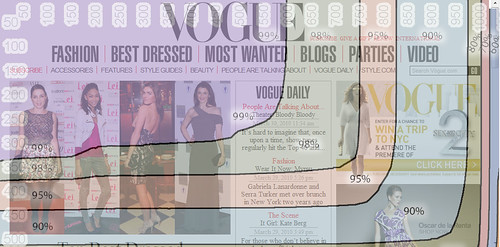
Vogue's Homepage Size vs User Browser Window Sizes

You can see that their masthead navigation links for “International” and “Video” are falling into the band of “90%” in Browser Size along with the site search form – this means that 90% of internet viewers are viewing pages with their browser windows large enough to see that right side content. The other 10% are not able to see this content, and might miss that it’s available. I’d bet that if we looked at Vogue.com’s analytics we’d find that those links get significantly lower click-throughs compared with more-commonly-visible areas on the page.

When we look into the 95% band, we see header links for “Renew”, “Parties”, and “Style.com” get lopped out of the viewing area, along with the ad content.

Vogue’s site is designed to be about 980 pixels wide – at the upper end of the typical range of non-dynamic width websites. When you see how the larger size results in a less-optimal experience for 5% and 10% of their overall audience, one can’t help but ask if the designers could have created a design at a smaller width while still retaining all the beneficial aesthetic value. I’d say that they most definitely could have, but they likely were ignoring the statistics when they set the site design specifications.

The wider design represents a lot of untapped opportunity, and money left on the table. While 10% may not seem like a large percentage, when you figure how many visitors Vogue’s website must receive annually, the raw numbers of people that fit into that demographic really add up. That 10% of people whose monitor screens were likely too small to easily see that right-side content on Vogue resulted in fewer people clicking through to view the Video content, International content, and the search form. The 5% of visitors would have missed the “Renew” link and the ad content, resulting in a little less revenue.

If you’d like to see a site that’s done a far better job of setting their size with user browser window limitations in mind, check out Nordstrom. Their site fits in a width closer to 770 pixels, making it work for a much greater percentage of internet users.

There are some caveats to using Google’s Browser Size utility. For one, the striations of browser size percentages that they display in that tool are based upon Google’s usage statistics, and not your site’s. While Google certainly has a huge usership sample to base these numbers upon, your site may have a significantly different demographic of users who have larger or smaller monitor sizes and browser window widths.

Google’s Browser Size utility is a fast way to check size based on overall internet averages, but if you want to do even more precise checking of your audience’s capabilities you need to check your analytics to see how many users are accessing your content with what size of windows and/or monitors. Here at KeyRelevance we do calculations based off of your analytics package for this — a lot of top web analytics (such as Google Analytics) will give you detailed numbers over time.

Regardless of which method you use, you need to take browser window size into account when redesigning your site. This is an easy way to bake more success into your website without trying to do anything complex or tricky.

New Google Maps Labs Feature May Reveal PlaceRank Secrets

Google Maps blog recently announced how users may opt into their new experimental features by clicking on the “conical flask icon” near the upper right of the Maps pages (when logged-in to your Google account):

Enabling Google Maps Labs

For most users, these will likely be more of a novelty than really useful. However, for local search marketers, one of the new beta features appears to me to potentially reveal a bit more than perhaps Google intended.

Most of us are familiar with the “site:” advanced search query refinement when conducting Google searches. These allow one to list out all pages indexed for a particular domain, or, when including a keyword with the “site:” command, one can see all pages Google’s indexed on a domain which include that keyword. For instance, to see all pages from CNN, one would conduct a search for “site:cnn.com“.

One interesting aspect of Google’s “site:” command is that the pages it returns from a domain are generally returned in ranking order. The highest-ranking pages on a domain are returned first, next-highest returned next, etc.

All this goes to show that most of Google’s special search commands will return results in ranking order, with the highest-ranking or highest-PageRank pages returned first. We already know that happens with keyword searches (albeit rank order is not solely based on PR any more — other factors are modifying order, such as various quality criteria and relevancy assessments). But, my point is that within the constraints of many special search commands Google provides, pages are returned to large degree in rank weighting value order.

Back to Google Maps Labs, one of the optional beta features really caught my interest – “What’s Around Here?”:

Enabling What's Around Here in Google Maps Labs

Once you enable this one, a “What’s Around Here?” button is added out beside the “Search Maps” button. It provides a very cool wild-card search capability to the Maps interface. So, if you first search for a map area, then click on this button, you’ll be shown the most-popular places in that mapped area.

From a local search marketer’s viewpoint, this wildcard feature is more than just a means to explore popular attractions in various cities. I think it’s potentially an invaluable tool for exploring what criteria factor into Google Maps’ search rankings. This tool provides marketers with a list of the most-popular business listings for any given city!

I think the “What’s Around Here?” feature is particularly useful for analyzing very small towns, since business listings in small towns have a lot fewer variables feeding into their search rankings. One can easily list out many of the variables between each business that ranks above another business in smaller towns, then compare those variables to isolate down which elements seem to be more prefered by Google Maps above others.

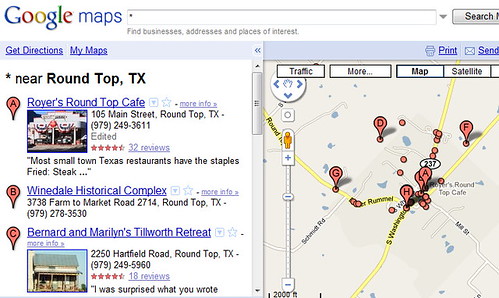
For instance, I love using one of the smallest towns in Central Texas for such comparative analysis – Round Top, Texas. It’s not at all a surprise to me to find Royer’s Round Top Cafe ranking tops for that tiny town, and it’s very telling to see all of the various on-page and off-page elements which factor into its rankings and the other top businesses in that town versus businesses which are ranking lower in Google Maps for that area.

Most Popular Businesses in Round Top, Texas

When Google Maps dramatically began introducing PlaceRank elements into ranking during the past year, the change not only added Places which may not be businesses into map results, but it also shifted to an algorithm which attempts to assess the relative popularity of addresses and locations within the maps, independent of business listing data. This paradigm shift added a lot of other factors into rankings that are less business-oriented and less-prone to commercial influences, such as Wikipedia pages about places.

Attempting to reverse-engineer Google’s algorithmic ranking methods in order to figure out what factors are more influential or less influential can be very helpful to the marketer or business that desires to change a website to improve its performance, and can make the difference in whether a business achieves landmark icon status in Google Maps versus being lost in the crowd. I think this tip on using the “What’s Around Here?” feature provides really great clues as to what elements work versus what elements are less influential.

I probably shouldn’t have revealed this local search optimization “secret” tactic, but it seems like so much of a no-brainer that I couldn’t resist opening a dialogue about the theory.

For another source of great info on ranking factors in Google Maps, see also David Mihm’s annual survey of Local Search Ranking Factors.

Steve Ballmer Keynote at SMX West

Steve Ballmer was interviewed by Danny Sullivan in this morning’s keynote conversation at SMX West in Santa Clara.

Steve Ballmer & Danny Sullivan - Keynote at SMX West 2010

One of the most interesting takeways from this session was Ballmer’s statement saying that Microsoft does *not* now intend to “kill off” Yahoo! Search – he further stated that within the deal agreement, Yahoo! may increase their search share via a wide number of initiatives. I’m thinking that if this is indeed the longterm strategy Microsoft is pursuing, they are doing the savvy thing of allowing multiple search engine applications which may better target multiple demographics.

Ballmer naturally responded with some of the usual positive or evasive statements that are typical of large-company CEOs when Danny asked questions that many are curious about. But, Ballmer also answered some questions very honestly/openly in a refreshing and direct manner — such as stating that they didn’t necessarily see Bing as moving overnight from a number two position in the search market pie. And, he said that no one sets out trying to be #2 – that they desire to do a really good job in search.

The main takeaway of the session is just how pleased and confident Ballmer is with how Bing is doing — that confidence implies that Bing is a major strategic initiative within Microsoft, it’s here to stay, and that they intend to continue to aggressively work to increase marketshare.

Google, you’re on notice! Looks like the underdog will be nipping at your heels, ongoing.