
Why Use Microformats?

Microformats LogoI’ve written numerous times about how and why to code Microformats into the webpages of local businesses (see here, here and here), yet the question keeps coming up “Should I spend the time and effort on integrating Microformats into my site’s pages?”

Just during the past couple of weeks, the question has arisen yet again, and along with it there was an additional development which further emphasizes why it’s a good thing and why webmasters should be incorporating the protocol sooner than later. More on this in a minute.

I believe I was likely the first to ever propose using hCard Microformats as a component of local search engine optimization, back in 2006 (see: Tips for Local Search Engine Optimization). Back then, I had seen how Microformats were begining to take off, and I saw indications of converging trends: the sharp interest from the major search engines in local search and yellow-pages-like functionality; the increasing uses for types of open formats and extensible semantic tagging; and, most telling of all, the involvement of a number of key technologists from within Yahoo! in the Microformats movement.

I knew that as search engines attempt to match up websites which they crawl with more formal, local business listing data, they would encounter some difficulties in using algorithms to interpret the data properly. Questions such as: What is the street address of this business webpage? What is the Business Name vs. other text on the page? What is the Street Name vs. the City Name? Other questions arise as well, since website designers mostly design towards their human audience rather than algorithms attempting to interpret meaning from raw data. For instance, what Business Category should this local business website be associated with?

Like other forms of semantic markup, Microformatting labels webpage content behind the scenes, specifically telling what each piece of data is while still displaying the webpage normally for human users. If webpages of local businesses were to incorporate hCard Microformatting, I reasoned, then search engines would have an easier time of associating the sites with map locations and business directory listings. Further, if a site contained such markup, the search engine could have a higher degree of confidence in accurately normalizing their data and matching up with user queries, so such pages could potentially rank better in the future.

However, when I introduced the idea, I was not aware of any search engine that was specifically seeking out this type of semantic data. While some Yahoo! personnel were throwing support behind the movement, there was no clear indication that their search engine would seek out specially labeled data fields nor treat them any differently.

Still, there were additional reasons for using the Microformats: they provided additional functionality for some devices and for users who installed special applications to read such content out of pages in order to easily make use of it. A great example would be the Operator Toolbar for Firefox which could allow a user to easily copy out the contact details from a webpage and save it into an address book, quite similar to how vCard electronic business card info can be transfered and harvested easily from email notes (vCard is supported by such mainstream applications as Microsoft Outlook).

The Yahoo! Local search team obviously believed that people could find Microformatting potentially useful, because they incorporated it into their Local Search results earlier in 2006.

Further supporting my prediction that this was an important and growing protocol, Google subsequently immitated Yahoo by incorporating hCard Microformats in Google Map search results in 2007.

Meanwhile, at conferences and via email, many individuals asked me whether Google Maps was “reading” Microformats from webpages. I’d spoken with a few Google engineers during this period, and they answered pretty uniformly: if sufficient numbers of sites made use of this, they’d almost certainly incorporate it as yet another signal in local search data. I knew that there really wasn’t “sufficient numbers” of sites incorporating it yet, but I continued to see indications that the protocol was growing as a trend, and a number of other optimization experts also threw weight behind supporting it as a component of good, local site design. So, I’d still have to truthfully answer, “no, it’s not any sort of factor that will directly make your pages rank any higher, BUT, you should make use of it anyway!” In most of the cases of local info pages I analyze on the web, it seemed like integrating the Microformats should be relatively low-impact in terms of development effort required.

SearchMonkey LogoIn the Spring of last year, Microformats may have finally achieved a tipping point when Yahoo! announced the release of their innovative Search Monkey development platform. SearchMonkey allowed developers to somewhat customize the display of their site’s listings when they appeared in Yahoo’s keyword search results. More to the point, SearchMonkey showed us that Yahoo’s bot and content processing systems could and did read in Microformats from webpages along with other structured data protocols including RDF and DataRSS. While this did not prove that Microformatting influences rankings in Yahoo! Local, it showed that an important step had been reached in a major search engine which could enable the protocol to be a ranking and normalizing factor in local search.

Now fast-forward to the present in 2009, and the question of whether to use Microformats is still getting posed to search marketing experts. On May 4th, someone asked well-known SEO, Michael Gray whether hCard and other Microformats matter for SEO. I think Michael gave a pretty well-reasoned answer overall, although I believe Microformat protocols are just about excruciatingly simpler than he represents, and I think there’s some good reasons to not be quite as conservative about using them as he suggests.

First of all, I believe the main advantages to using Microformats are:

  • They can help search engines identify Business Name, Address, Phone, and Categories on webpages. Variations in formatting on various sites can contribute to misassociation of data elements. Imagine “Houston’s Restaurant on Dallas Street in Paris, Texas”. If an algorithm is attempting to interpret this in order to index the business/site, how does it know for certain what element is name vs. street address vs. city?
  • They can help search engines in associating the website with their listings within the engine’s directory listings content a vital step in “canonicalizing” business information. Google gets business listings from data aggregators and business directory partners, and they have to associate all the various sources of data for a particular business location with a single business listing. This is not a simple activity! Differences in ways a business name is spelled, different ways addresses are written, and different phone numbers all can result in businesses’ listings getting duplicated and diluted in ranking ability within Google Maps. So, having Microformats on your business webpage could help it get properly associated with directory listings already within Google.
  • Microformats facilitate the ease by which users can copy off a business’s contact information to store in their address books and elsewhere.
  • Microformats could also help open up content for use by other developers in unforseen and advantageous ways. For instance, by including the longitude and latitude of your business address in your pages, others can easily port the precise location over to the mapping app of their choice if left up to just using the street address, mapping systems can frequently make significant errors.
  • It’s just not all that hard to add them to sites which display addresses of local places. Some very simple development and coding which could be done within just an hour or two are all that’s required for most sites.

Google actually does a pretty good job of “canonicalizing” classic business listing data from local biz websites, so if my theories on why it could be beneficial for SEO in the future are correct, there are a lot of sites where it likely wouldn’t have all that much impact upon performance even if/after Google begins recognizing it as a local site search signal. It could help them collapse dupe listings down to a single one, which could boost that listing’s ranking weight. But, for businesses with already easy-to-interpret addresses or where Google hasn’t had difficulty in grouping related listings together, it likely wouldn’t have any ranking effect whatsoever.

As of just last week, there’s an even more compelling reason to incorporate Microformats, though: Google is following close upon the heals of Yahoo again and has announced that they’re introducing “Rich Snippets” in Google search results pages essentially the Rich Snippets are more enhanced search result listings, allowing the display of star ratings and the numbers of reviews for content on the pages. Similar to Yahoo’s SearchMonkey which allowed some customization of search listings, Google is allowing this special content display initially for pages which incorporate hReviews Microformat.
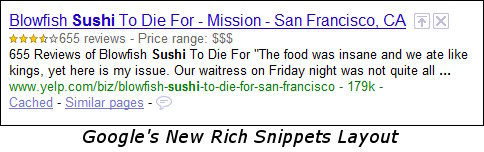
Google SERP listing for Yelp with Rich Snippets

Many of us theorized that Yahoo’s SearchMonkey could be potentially advantageous to sites, since search result listings which look different can stand out from the crowd, attract more users’ notice, and therefor have a greater chance of being clicked upon. Indeed, subsequent research showed that SearchMonkey’s special listing treatment could increase CTR by 15%!

There’s every reason to believe that display enhancements likely could improve CTR within Google search results as well, so there are great incentives to adopt the hReview protocol for those sites which have reviews and ratings content. This is only the first stage of Google’s work in Rich Snippets, however, and it’s pretty certain that Google will introduce more types of structured data into special display within search result listings. hCard and hCalendar content are some top candidates poised for imminent introduction when Google expands this.

We’re now seeing adoption of hCard in even some high-popularity sites such as Twitter now, so it may be time to actually declare Microformats to be “mainstream”!

So you see, there are compelling reasons to use Microformatting in the here-and-now, rather than putting it off. It’s generally not difficult to implement, it enhances site functionality for good user-experience, it generally won’t interfere with existing graphic layout, it could eventually help in rankings, and it might soon help in terms of click-through rates or overall conversions.


Technorati Profile

Special Characters Are Lucky Charms For Twitter ♥ ☾ ★ ♣

As you surf the flow of Tweets running through the ever-heating-up medium of Twitter, you can frequently see an unusual little character icon or two used to decorate people’s postings. I’ve taken note of these over time, and I suspect that using these little graphic icons can sometimes increase the ability or a particular Tweet to stand out from the crowd. If you use Twitter to promote links to your blog articles and webpages, you might consider adding these special icons to your repertoire. I think these special characters can be Lucky Charms for your Twitter posts, if used carefully.

I recently experimented with adding some special characters to one of my Tweets, and it resulted in quite a number of Re-Tweets as well as clickthroughs. Although it involved an already highly-popular topic (Star Wars), I think the Tweet grabbed more people’s notice because the stars I added to it allowed it to stand out from the crowd more as people scanned the stream of Tweets running through their Twitter accounts:

Happy Star Wars Day Tweet

Special Characters are not hard to add to Tweets, if you’re posting from online. They can be trickier if you’re attempting to Tweet via your wireless devices, since those do not all support extended character sets.

Here’s the classic “Lucky Charms” known to morning cereal afficianados — hearts, moons, stars, and clovers: ♥ ☾ ★ ♣

One of the most frequently used symbols in Tweets is a music notes symbol, when individuals Tweet the current song they’re listening to:

Music Tweet

For those using Blip.fm, it’s very easy to Tweet out little messages indicating what you’re listening to, if you tie the services together, and Blip appears to automatically tack on the music notes symbol.

Special characters are handled in HTML and other markup languages via “entity reference” codes or “character references”, of course, and are nothing new. You may be able to simply copy and paste a special character that you want to use, but I’ve also found that you may need to actually paste in the special character code in order to get the symbol to appear.

Some special characters are really too intricate to adequately convey, unfortunately.

I’ve made a helpful list of special character entity codes which you can easily copy-and-paste into your Tweets. These are not all special characters, since I left out the more boring special punctuation characters, foreign language letters and symbols which I think are unlikely to communicate in the tiny letter size employed by Twitter:

♠ ♠ (solid spade)
♤ ♤ (open spade)
♣ ♣ (solid club / shamrock / clover)
♧ ♧ (open club / shamrock / clover)
♦ ♦ (solid diamond)
◊ ◊ (open diamond / lozenge)
♥ ♥ (solid heart)
❤ ❤ (heavy solid heart)
❥ ❥ (heavy rotated solid heart)
♡ ♡ (open heart)
☻ ☻ (solid happy face)
☺ ☺ (open happy face)
☹ ☹ (open frowny face)
₪ ₪ (arabesque)
♀ ♀ (female symbol)
♂ ♂ (male symbol)
↑ ↑ (up arrow)
↓ ↓ (down arrow)
→ → (right arrow)
← ← (left arrow)
↔ ↔ (right & left arrow)
⇑ ⇑ (double up arrow)
⇓ ⇓ (double down arrow)
⇐ ⇐ (double left arrow)
⇒ ⇒ (double right arrow)
⇔ ⇔ (double right & left arrow)
Δ Δ (triangle / delta)
£ £ (pounds)
¢ ¢ (cents)
€ € (Euros)
¥ ¥ (Yen)
♕ ♕ (White Queen - crown)
♔ ♔ (White King - crown)
♘ ♘ (White Knight - horse)
♚ ♚ (Black King - crown)
♛ ♛ (Black Queen - crown
♞ ♞ (Black Knight - horse)
© © (copyright)
® ® (registered trademark)
™ ™ (trademark)
• • (bullet / solid circle)
∅ ∅ (zero with slash thru)
¿ ¿ (upside down question mark)
‹ ‹ (less-than)
› › (greater-than)
« « (double less-than, quote)
» » (double greater-than, quote)
№ № (Number, numero symbol - "No.")
★ ★ (solid star)
☆ ☆ (open star)
✪ ✪ (circled white star)
✹ ✹ (12 pointed black star)
† † (cross or dagger)
‡ ‡ (double cross)
☠ ☠ (skull & crossbones/ pirates/ Jolly Rodger/ poison symbol)
☽ ☽ (waxing crescent moon)
☾ ☾ (waning crescent moon)
☪ ☪ (Islam - crescent moon & star)
☭ ☭ (Communist - hammer & sickle)
❦ ❦ ( upright - floral heart / hedera / ivy leaf)
❧ ❧ ( sideways,rotated - floral heart / hedera / ivy leaf)
♩ ♩ (single music note - quarter note)
♪ ♪ (single music note - eighth note)
♫ ♫ (double music note - single bar note)
♬ ♬ (double music note - double bar note)
✡ ✡ (Star of David)
☯ ☯ (Yin/Yang)
☮ ☮ (Peace Sign)
☸ ☸ (Dharma wheel, sailing wheel)
¤ ¤ (currency or sun)
☀ ☀ (sunshine - sun)
⊕ ⊕ (circled plus or cross in a circle)
⊗ ⊗ (circled times or exxed circle)
℞ ℞ (RX - prescription symbol)
☁ ☁ (cloud - cloudy)
☂ ☂ (umbrella - rain)
☄ ☄ (comet)
☎ ☎ (solid phone)
☏ ☏ (open phone)
☑ ☑ (check box)
☒ ☒ (exxed box)
☚ ☚ (left-pointing finger)
☛ ☛ (right-pointing finger)
☝ ☝ (up pointing finger)
☞ ☞ (down pointing finger)
☠ ☠ (skull & crossbones)
☥ ☥ (Ankh)
☢ ☢ (radioactive)
☣ ☣ (biohazard)
✓ ✓ (check mark)
✝ ✝ (Latin Roman Cross)
✞ ✞ (Latin Cross 3d shadow)

It appears that the best way to send the special characters may be by simply copying the icon you wish to use and then pasting it into a Tweet. I experimented with copying the character code and with copying the displayed character itself, and both seem to work, though.

Just a note or two of caution: I believe special graphic characters such as these ought to be used to spice up posts occasionally, and should be avoided as a “main ingredient”. Use them sparingly, like exclamation points. If over-used, your audience will get graphic icon fatigue and their familiarity will lessen their ability to grab attention.

Again, these special characters won’t work on all devices! I can see the characters online through my PC browser, but not through my PDA. Via SMS, the character doesn’t go through at all, while surrounding text displays as normal. Via web browser on my PDA, there is just an unknown generic “block” character that appears in place of the special character. So, choose carefully if you wish to use these!

So, I’d also like to hear what you think about this. Have you used such characters to spice up your Tweets? If so, how effective do you think they are? Do they increase CTR when links are included?

Let us know what you think in the comments below.

Your Audience & Customers Define the Value

When it comes to traditional marketing, companies are so entrenched in having to define their value statements, and defining them in their marketing messages they don’t even realize that with today’s new technologies and mediums to communicate in, it’s really the customers who are defining what the value is of their products. While company executives are so focused on “features” providing what they perceive is value, they never stop and think about what the person who is plunking down their hard earned dollars to buy the product or service truly perceives as value.

The same can be said of any type of content you are producing for consumption on the internet. In the end it is the audience who is going to decide the value. While you are thinking these are great tips on how to change a light bulb and that’s the value, the audience perceives something else as more valuable about your content. It could be that the tips save them valuable time and money, something you likely hadn’t considered. While you might be thinking certain points of a video you produced about how your product works is the value, the audience viewing it find more value in how it saved them a ton of time figuring out how to integrate your product in with something they are already using, making both products exceptionally useful to them.

value-of-goldOnce your audience finds value in the content you are providing, when they truly believe this content is worth its weight in gold, that’s when it has the potential to spread like wildfire. It may not hit the front page of Digg, but if one loyal audience member finds true value in your content they are going to spread it out to their friends by sharing their experience with it. People love to relate the experiences and those experiences, if valuable, are powerful marketing agents all on their own. The notion of “look what it did for my friend Suzie” after Suzie has explained the value she found is a very persuasive tool, and then all of Suzie’s friends relate it to their friends. If these friends are in social networks like Facebook, MySpace, or an Ning network out there, the potential for the content going from reaching just a few people to instead touching thousands is great.

This is why marketers both online and offline need to stop thinking of themselves as the “be all end all” decider of what is of value in marketing messages. Instead of consistently trying to push messages on an audience or customer base, they need to start sitting back and listening to the current conversations going on about what they are marketing and how those current messages are being received and interpreted. By listening to the conversations marketers can learn a lot more about their demographics and how they think, instead of just assuming because they are a certain age bracket and sex or race they act a certain way. Things change in the real world and the internet and the social media platforms that have been created offer marketers access to a huge , unself-conscious and very brutally honest, focus group.

Let’s face it the way traditional marketing, that of continually pushing the message that’s been carefully crafted, has changed. Audiences become banner blind, they fast forward through commercials on their Tivos, they channel hop on the radio because they do not find these messages or this type of content of any value. Marketers in today’s world of instant soapboxes (blogs) and the world’s fastest telephone chain (Twitter, Facebook & even email) have to now understand what the customers are deeming as value and create content focused on that value, not the values they crafted in a sterile office space to make CEO’s and senior management feel better about themselves. Whether companies like it or not, customers are now defining a lot of what a brand, product or service means.

There’s a Lot More to Social Media than Just Putting Up a Profile

A lot of companies these days are hopping on the social media bandwagon with the mistaken notion that it’s free, quick & easy. Little do they realize being successful in social media requires a lot more resources, time & hard work than what the media portrays. There’s a lot more to being successful in social media than putting up a profile on every social media platform there is. if-you-build-it-they-will-comeJust because you built it, doesn’t mean “they will come”, far from it.

While it does make sense from a reputation monitoring standpoint to secure your brands identity on every social media platform out there before some “squatter” comes along and scoops up the account in hopes of reaping a huge financial reward, that doesn’t mean instant success. Just because you put that profile up there doesn’t mean it’s going to rank in the search engine results for a certain keyword or even your brand name, either. There are some few instances where just putting the profile up will garner a ranking, and sometimes in the top 10 (especially for non-competitive terms), but usually that’s fleeting, eventually that profile will settle out to much lower in the search engine rankings. Likewise, just because you put the profile up doesn’t mean you are going to automatically acquire 1,000 friends overnight, unless of course you are Oprah. Unfortunately for common folk and businesses it just doesn’t work that way, there’s a lot of hard work involved.

There’s a reason why the word “social” is put in front of media. Having a successful account or profile on any of these platforms requires you (the account holder) to be social. That means getting out there on that platform and having conversations with people, being honest and transparent about who you are and why you are there, promoting your profile on your blog or website to encourage interaction, interacting and sharing with people in that community and most of all listening. These actions are what will bring your profile the power to rank in results or become a power account on a social media site.

In this big internet world there are a lot of social media platforms out there and it certainly is time consuming to be social and active in every one. In fact trying to be active on every social media platform might just be a total waste of time and resources, something no company needs in today’s economic environment. This is where some of the hard work comes in. To get the most out of your efforts in social media and see more success, its wise to be most active where your audience is holding the conversation, not active in a “popular” platform. The key to this is actually knowing who your audience is and where they are holding a conversation. Some companies believe that their audience is the same both offline and online, but they shouldn’t assume. A lot of times companies can see a dramatic shift in audience demographics when switching communication mediums because of the way it is consumed. This is where a lot of research comes into play and strategies need to be planned – not easy work by any means.

So at the end of the day, don’t be lured in by the promise of quick, easy and cheap or that phrase from Field of Dreams – “If You Build It They Will Come“. When it comes to social media and being successful it takes a whole lot more than just slapping up a profile and saying “Hey I’m here!”, most of the time an audience will say “So what?! So am I!”. Remember the most important person in social media is the end user, to be successful in social media that means providing them something they feel is valuable – that even includes your profile on a social media platform.

Dallas Cowboys Practice Field Disaster – Citizen Reporting & Photos

I’m saddened to report that there was a terrible disaster in my neighborhood today – the Dallas Cowboys’ indoor practice field in Valley Ranch was hit by the strong winds in the violent Texas storm that blew through this afternoon, and the lightweight structure collapsed under the wind strain.

Firemen look over Dallas Cowboys Practice Facility Wreckage

It was just shortly after the storm passed that I was listening to the TV in my home with half an ear, relieved that my trees didn’t fall on my home, when I heard the news that the Dallas Cowboys’ facility collapsed. This place is just south of my home a few blocks, and I got really familiar with the location when my kid sister moved out of my house (she’s about half my age and lived with me when she started college in Irving) — she lived literally right across the street from the giant structure.

I call it a gym, but the place was really an indoor field — a large, inflated roof covered the whole thing, much like the roofs over some sports domes. I knew immediately that the storm must’ve really hit the roof hard, and finally gotten ahold of it and ripped it off, similar to how the Superdome roof was ripped off in New Orleans, back during Hurricane Katrina.

I’m an amateur photographer, and I couldn’t resist jumping straight outside to snap a few pics of the collapsed building.

Wreckage and Emergency Personnel - Dallas Cowboys

I speak at internet marketing conferences and write about optimizing websites for search, and one area I’ve often spoken upon is how to leverage photos to get links and to drive traffic to websites. There’ve been a number of occasions when journalists have contacted me, asking to use my photos to illustrate their stories, and I almost always allow them to do so for free, so long as they give me a link back in return. A link is the online, technical equivalent of a by-line or credit-line, and it’s only fair that I get credit for my work.

I’ve had bloggers often ask me how to promote their blogs, and this is an example of how to go about it. Most of us see or attend various news-worthy or interesting events in our lives, and it doesn’t take much to snap photos of them and provide them for others to use in return for a link back.

So, if you’re a journalist or blogger interested in writing on the Dallas Cowboys facility’s collapse, you’re welcome to use any of my photos – click on the ones in this story and they’ll take you to my Flickr account where you can find more, and you can see instructions on how to cite me as the photographer.

My heart goes out to the players who were injured today, and to their families. I really hope that everyone will be okay!

(* I’m right now weathering the second strong storm moving through the area – I sure hope my home and trees survive it, too!)

Making Your Content Portable For Your Audience

At the beginning of the week I wrote a piece for Search Engine Watch entitled, “Do You Know Where Your Audience Is?” Knowing this is a piece of the social media puzzle that can decide whether your strategy is going to be a successful venture or a failure. There are a few other pieces to that puzzle, but generally, knowing where your audience is is foundational to any social media strategy.

moving-menIt affects even how portable you make your content. What I mean by making your content portable is making it easy to share, making it easy for your audience to move it across one social platform to another. If your audience finds your content valuable they are going to want to share it whether its through social bookmarking, social news, email or twittering, people want to share great things they experienced. Content that has value can create buzz and word of mouth without the author really realizing what’s going on. If it’s really valuable to the audience and there’s no way to share it, that content might not take off, however just the opposite can happen. If you believe you are always putting out valuable content and you want it shared and you have too many options to share it, this can be a turn off as well as confusing to your audience.

Lets take for example a blog, there are a few ways a blog can be shared. The blog itself can be found to have a lot of great content, and people who just get to your blog via a twitter link, Stumbleupon or a link through email might not be quite that educated on RSS. So having a dozen or so of ways to subscribe to your blog by RSS can be confusing and a turn off, rather than a turn on to people coming to your blog. If you use Feedburner or other like services to handle your subscriptions, take a look at your audience – what are they using to read your blog and choose those top 3-5 icons to show for RSS subscriptions. While you may think you need every single RSS aggegator listed, your audience is likely telling you differently, listen to them, they understand what’s valuable to them. For the most part, Google Reader has become the giant here, people share blogs and blog posts through the “share” option in Google Reader as well as porting out their list of blogs so their own readers (if they own a blog themselves) can keep up to date on what they view is valuable.

Then there’s blog posts and making them easy to share. Again, just like having too many aggregator icons listed, having too many social bookmarking and social news icons in a drop down or spread across the bottom of your posts can be a real turn off. Look at your analytics, listen to your audience, what are they saying about how they found your content? Is your content the type that would really get traction on Digg? Is your audience even on Digg? You’re audience might be on a very niche site like Boudica, which caters to women and not on Digg. In this case having a sharing option for Boudica or sites like it, just might be the better option. Generally the audiences can cross platforms and if your audiences feels its good enough for Digg, they’ll get it there. The point is make it sharable for where your audience hangs out, not an audience who isn’t interested.

When making your content portable, it’s also important to keep in mind, content doesn’t always equal text. Content that’s valuable to your audience can take the form of pictures, podcasts, videos or even slideshares. Making these types of content easy to share is just as important as making your text content easy to share. Make it easy for your audience to embed things, provide the embed code or the link code and well as the sharing buttons you’ve decided are valuable to your audience. Don’t forget to also provide ways to share through email and social networking sites – if your audience is there.

Don’t stress that you need to have every way to share out there. Yes there are plugins for blogs that can list all the popular sites, and are easy to install, but is your audience on those sites? Are you loosing out on having your content on a site where your audience is because you are focusing on where someone else’s audience is? Before you decide to plaster your content up with a million “submit to” buttons, analyze your audience and listen to where they want to submit your content first.